Key Takeaways
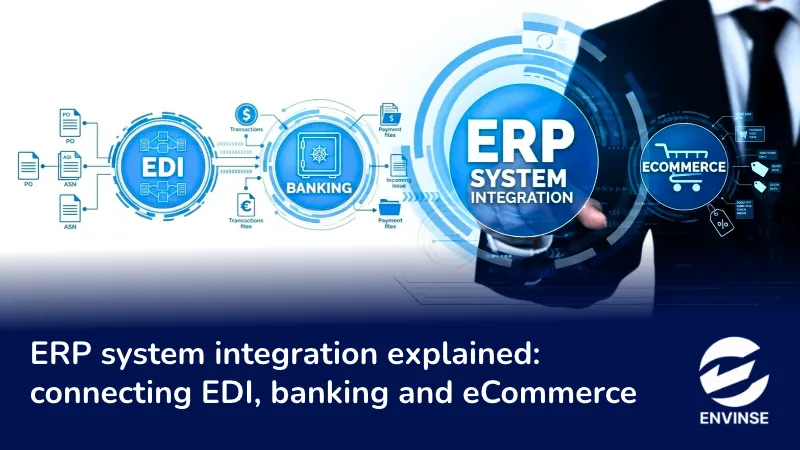
- ERP system integration connects your ERP to outside systems so orders, payments and inventory move without retyping.
- EDI integration turns retailer documents (850, 856, 810) into ERP sales orders, shipments and invoices. Documents that don't match each other trigger chargebacks.
- Banking integration runs in 2 directions. Bank transactions come in for reconciliation. Payment files go out for ACH, wires and positive pay.
- Reconciliation speed depends on matching rules and entry types set up before go-live.
- eCommerce integration needs one owner per data type. The ERP owns inventory and financials. The store owns checkout.
- Pick the method per connection. A native connector, an EDI provider and a custom API can all run against the same ERP.
Your ERP is only as accurate as the last person who retyped data into it.
Most growing companies bought an ERP to get one set of numbers. Then they kept the retailer portal, the bank website and the online store running on the side. Someone downloads purchase orders. Someone exports bank statements to CSV. Someone fixes inventory after the store oversells. ERP system integration takes those people out of the middle of the data flow.
This guide explains how the 3 connections that cause the most rework function in practice: EDI with trading partners, banking, and eCommerce.
What is ERP system integration?
ERP system integration is the connection between your ERP and the other systems that create or use business data. Orders, shipments, invoices, payments and stock levels move automatically in both directions, and the ERP stays the system of record.
The gap is wide across the market. MuleSoft’s 2025 Connectivity Benchmark Report found the average organization runs 897 applications, and only 2% of IT leaders say more than half of them are connected.
Mid-market companies run fewer apps. The pattern holds anyway: the ERP sits in the middle and the edges stay manual.
These are the 3 edges that cost the most labor when they stay manual:
Connection | What moves | Who does the retyping today |
EDI | Purchase orders, ship notices, invoices, acknowledgments | Order entry, warehouse, accounts receivable |
Banking | Bank transactions, payment files, lockbox remittances | Accounting and treasury |
eCommerce | Orders, inventory, prices, customers, refunds, payouts | Operations, customer service, finance |
How does ERP integration work?
Every ERP integration does 3 jobs. It moves data, translates formats and confirms delivery. The integration method decides who builds and maintains each job.
Method | How it works | Best fit | Watch for |
Native connector | Prebuilt app between 2 known systems | Common pairs with standard workflows | Limited to the fields the vendor chose to sync |
Custom API integration | Your code calls each system’s API | Unique workflows and niche systems | You own maintenance when an API changes |
Middleware or iPaaS | A cloud platform routes and maps data between many systems | 4 or more connected systems | Subscription cost rises with volume |
EDI translator and network | Converts X12 or EDIFACT files into ERP records, delivered over a VAN, AS2 or SFTP | Retail and distribution trading partners | Per-partner mapping and per-transaction fees |
File-based import | Scheduled CSV or bank file drops | Banks and legacy systems without APIs | Delays and failures nobody notices |
Point-to-point links work fine for 2 or 3 systems. Past that, every change breaks a connection someone forgot existed.
If your systems have APIs and no connector, our guide on why business software can’t talk to each other and how API integration fixes it covers the build. Envinse designs and supports these connections through its third-party application integration practice.
How does EDI ERP integration work?
EDI ERP integration converts standard documents from your trading partners into records inside your ERP. It also turns ERP records back into documents your partners accept. US companies use the ANSI X12 standard. Most other regions use UN/EDIFACT.
If you sell to big-box retail, EDI is a condition of the account. Retailers expect it from the first purchase order.
The documents that run order-to-cash
X12 code | Document | Direction (supplier view) | What it becomes in the ERP |
850 | Purchase order | Inbound | Sales order |
855 | PO acknowledgment | Outbound | Confirmation of accepted lines, quantities and prices |
860 | PO change | Inbound | Sales order update |
856 | Advance ship notice (ASN) | Outbound | Built from the shipment, with carton and pallet detail |
810 | Invoice | Outbound | Built from the AR invoice |
997 | Functional acknowledgment | Both | Proof that each file arrived |
846 | Inventory advice | Outbound | Stock levels shared with the partner |
What happens to a purchase order, step by step
- The retailer sends an 850 through a VAN, AS2 or SFTP connection.
- The translator checks the file against that retailer’s specification and returns a 997.
- The map converts each segment into a sales order field: customer, ship-to location, requested date, price and quantity.
- The item cross-reference converts the retailer’s SKU or UPC into your item ID.
- The ERP validates price and item. Mismatches go to an exception queue before anyone picks the order.
- The warehouse ships. The ERP builds the 856 with carton-level detail and GS1-128 label data, and sends it before the truck arrives.
- The AR invoice becomes the 810. Its quantities and prices must agree with the 850 and the 856.
Where EDI integration breaks
- Every retailer has its own version of the same document. One partner’s 850 won’t map the same way as another’s, so each partner needs its own map and test cycle.
- The web portal trap. Many suppliers start on their EDI provider’s web portal because it’s cheap. Orders still get retyped into the ERP, so the company pays for EDI and keeps the double entry.
- ASN timing and accuracy. A late 856, or one that lists different cartons than the truck holds, is the fastest route to a chargeback.
- Missing cross-references. One new retailer SKU without a matching item in the ERP stops the whole order.
- Locked mapping. Some providers only let their own team edit maps, so a one-field change waits in a ticket queue for days.
Pro tip: Before you scope an EDI project, collect every trading partner’s implementation guide and chargeback schedule. Price the work per partner and per document. A supplier with 3 retailers and 5 document types has 15 maps to build and test, not 5.
How does ERP banking integration work?
ERP banking integration connects your bank accounts to the ERP in 2 directions. Bank activity flows in so the ERP can match it to recorded payments and receipts. Payment instructions flow out so vendors and employees get paid without anyone uploading files to a bank portal.
Manual matching is where the close stalls. Ledge’s 2025 month-end close benchmarks found half of finance teams need 6 or more business days to close, and respondents named cash reconciliation as their most time-consuming task.
Flow diagram of ERP banking integration showing bank feeds and statement files coming into the ERP for reconciliation, and ACH, wire and positive pay files going out to the bank
Inbound: getting bank transactions into the ERP
- Bank feeds through an aggregator. Plaid or MX pull transactions on a schedule. Acumatica’s bank feeds connect to more than 14,000 financial institutions through these 2 aggregators.
- Bank statement files. BAI2 and BTRS are common with US banks. MT940 is the SWIFT format. camt.053 is the ISO 20022 format. Banks deliver these over SFTP, or your team downloads them. Use files for banks the aggregators don’t support and for treasury accounts that need full detail.
- Lockbox and remittance files. The bank deposits customer checks and sends a file listing which invoices each payment covers. The ERP applies the cash to open AR.
Outbound: sending payments from the ERP
- ACH files in NACHA format for vendor payments and payroll.
- Wire instructions for international and high-value payments.
- Positive pay files. The ERP sends the bank a list of every check issued, and the bank rejects any check that isn’t on the list. This is one of the cheapest fraud controls a finance team can turn on.
- Bank APIs. Some banks now accept payment instructions by API, which removes the manual portal upload.
Reconciliation: where the hours go
Matching is where reconciliation time goes.
- Matching rules pair a bank line with an ERP record by amount, date window, check or reference number, and payee.
- Entry types cover recurring items with no source document: bank fees, interest, merchant fees and loan payments. Without them, every fee lands on the exception list.
- Bank transaction rules create those entries automatically when a description repeats, such as a monthly service charge.
- One-to-many matching handles one deposit that covers several invoices, which is normal for card settlements and lockbox batches.
- Duplicate control matters. If a bank feed and a manual file import both run on the same account, the ERP sees every transaction twice.
Insight from our implementation work: Writing the matching rules takes longer than connecting the bank. During testing, we pull 3 months of history from each account, group the statement descriptions, and build an entry type and rule for every pattern that shows up more than twice a month. Teams that skip this step go live with a feed that imports everything and matches very little.
What should eCommerce ERP integration cover?
eCommerce ERP integration keeps your store and your ERP in agreement on orders, inventory, prices, customers, refunds and payouts.
- Assign one owner per data type. The ERP owns the item master, inventory, pricing rules and financials. The store owns the cart and checkout.
- Sync inventory and order status in near real time. Batch financial postings daily.
- Treat payouts as a banking problem. Payment processors deposit sales net of fees and refunds. The ERP has to split gross sales, fees and refunds so the posting equals the bank deposit, or reconciliation breaks every day.
We covered store-to-ERP sync in detail in your storefront and your ERP shouldn’t be two different businesses.
Why do ERP integration projects fail?
These are the failure patterns we see most often:
- Dirty master data. Duplicate customers and items without cross-references cause sync errors on day one.
- No owner per data type. Two systems both editing the same field create sync loops and conflicting records.
- One method for everything. Forcing EDI, banking and eCommerce through a single tool usually means one of them gets a weak connection.
- No monitoring. An integration fails on a Friday and nobody finds out until month-end.
- Treating go-live as the finish line. Retailer specs change, banks update file formats and APIs get new versions.
How should you plan an ERP system integration?
Location matters, but it’s a tiebreaker. Run checks 1 through 8 first.
A Houston-based partner works your hours, can run discovery workshops on-site, and already knows the region’s core industries: energy, healthcare, logistics, and manufacturing. Envinse is headquartered at 7324 Southwest Freeway in Houston.
A local address guarantees nothing about quality. A local partner who also passes the other 9 checks is the strongest choice you’ll find.
Frequently asked questions
What is the difference between ERP implementation and ERP integration?
ERP implementation sets up the ERP itself: modules, workflows, data migration and user roles. ERP integration connects that ERP to outside systems such as trading partners, banks and online stores. Most projects need both, and integration scope should be defined during implementation.
Do I need EDI integration if my customer offers a web portal?
A web portal meets the retailer’s EDI requirement, and someone still copies each order into your ERP and keys the ship notice back into the portal. Once order volume grows past a few POs a week, direct EDI to ERP integration pays for itself in labor and fewer chargebacks.
What EDI documents does a supplier need first?
Most retailers require the 850 purchase order, 856 advance ship notice and 810 invoice, plus 997 acknowledgments. Many also require the 855 PO acknowledgment and 846 inventory advice. Check each partner’s implementation guide, since requirements differ by retailer.
Can my ERP connect directly to my bank?
Yes. Most modern ERPs connect through aggregators such as Plaid or MX, through statement files delivered over SFTP, or through bank APIs where the bank supports them. Payments go out as ACH, wire or positive pay files.
What is the difference between a bank feed and a bank statement import?
A bank feed pulls transactions automatically on a schedule through a secure connection. A statement import loads a file such as BAI2, MT940 or camt.053 that the bank sends or your team downloads. Feeds suit daily operating accounts. Files suit banks the aggregators don’t cover and accounts that need full treasury detail.
Should I use iPaaS or custom API integration?
Use a native connector when one exists for your 2 systems. Use iPaaS when you need to coordinate 4 or more systems. Use a custom API integration when your workflow is unique or no connector exists, and budget for ongoing maintenance.
How long does an ERP system integration project take?
It depends on the number of connections and partners. A single native connector can go live quickly. EDI timelines depend on each trading partner’s testing schedule. Envinse typically delivers working integrations in 6 to 12 weeks after discovery.
Every manual handoff between your ERP and the outside world leaks money: a chargeback here, a late close there, an oversold item on a busy weekend. Close those handoffs one connection at a time, starting with the one that eats the most hours. Companies that finish the job run the whole business on one set of numbers, and that is the standard Envinse builds to across its ERP and business system solutions.